Showing posts with label computers. Show all posts

Wednesday, August 4, 2010

New green alternative to photocopying at the library

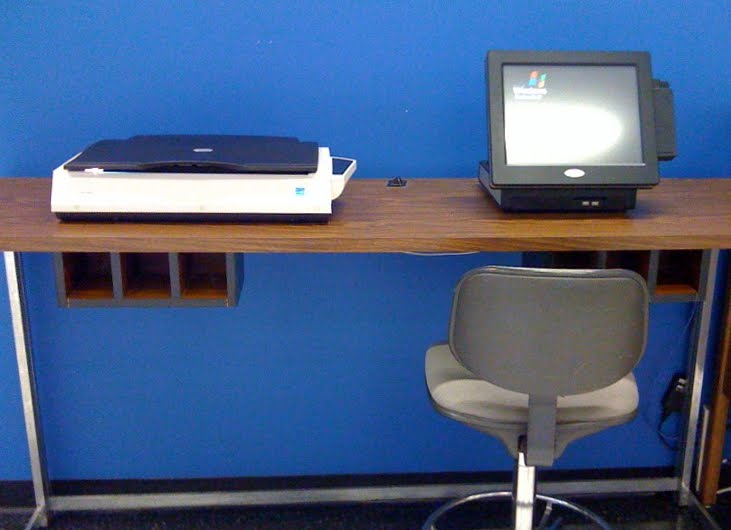
In an effort to further Stevens' efforts towards being a green campus, the library has a new, easy-to-use scanning station. Instead of photocopying, you can now scan book pages or documents, and then either save them to your usb drive or e-mail them directly from the console.

The simple touchscreen interface allows you to scan in color, black and white or greyscale, and save your files in various formats, including pdf and jpg. You can also use the station to edit and adjust your documents after scanning.

The scanning station is free to use, and located on the first floor of the library, on the north wall (at the beginning of the row of public computers.)

Thursday, September 3, 2009

Safari books upgrade + contest

The library now subscribes to the entire collection of Safari Books Online. The collection contains over 8,000 computer science and technical books, with new publications added continually.

The Safari online database has a limit of 5 concurrent users, so if you can't access a book, please try again after a few minutes.

Safari is currently running a Dynamite Coding Skills contest, where you can win a personal 3 month Safari subscription and an invitation to join Tim O'Reilly at an event next year. More information is available here: http://safaribooksonline.com/Corporate/DynamiteCodingSkills/.

Wednesday, January 14, 2009

*Important information for off-campus users connecting via VPN*

A heads-up from the IT department regarding off-campus users who connect to online library resources through VPN:

Information Technology is replacing the two VPN (Virtual Private Network) servers with a new server, which is installed and ready for use. If don't use VPN services this announcement does not pertain to you. If you use VPN services, or have them configured on a Stevens issued notebook and/or individually owned computer that is used off-campus, you are required to change your VPN configuration.

Links to instructions on how and why to use a VPN connection are below. The old VPN servers will be removed from the network on January 24, 2009. ALL users must remove their old profiles and create new ones to connect to the new VPN server.

The old VPN servers, vpn02.cc.stevens-tech.edu and vpn01.cc.stevens-tech.edu are being replaced by the new VPN server vpn.stevens.edu. Since the configuration of the VPN client has changed attempts to update your old VPN profile with the new VPN server name will not work. Creating a new profile, and removing the old one is easy, and only takes a few steps to complete. The new VPN connection method is more secure than the previous. The most notable change will be that the old vpn02 connection used the PIPELINE password while the new vpn.stevens.edu connection uses the CAMPUS Domain password.

Set up instructions for Windows XP, Vista, MAC OS X including iPhone and iTouch and Linux are available at http://www.stevens.edu/itwiki/cgi-bin/wiki/index.php/VPN.

Some Campus Domain Users do not have the rights to make this change. If you try to make this change and access is denied contact the Information Technology Help Desk at 201.216.5500. Even if you do not use the VPN connection regularly, now is the time to add the new VPN configuration to your system and test the connection. Remember to use your CAMPUS Domain password when using the connection.

If you have not changed your Domain password recently now is a good time to do it. Your domain password should be unique to this account, not used anywhere else and a password only you know. Information on changing your domain password can be found at: http://www.stevens.edu/itwiki/cgi-bin/wiki/index.php/Campus_Domain_Account#Changing_your_Password.

If you need assistance or a password reset, contact the Information Technology Helpdesk at 201.216.5500 or www.stevens.edu/helpdesk. Please remember to remove your old VPN profile after you have installed the new one.

Wednesday, September 26, 2007

Got a question? Ask it online!

SC Williams Library is happy to introduce its new online reference service! We'll be using Meebo, a web-based instant messaging application that allows us to sign on to multiple IM clients at one time, so you can find us on AOL, Yahoo, MSN and GoogleTalk. This service will be available at the following times*:

Monday, Tuesday and Thursday: 9am to 6pm
Wednesday: 9am to 10pm
Friday: 9am to 5pm

Or, just add us to your friends list to see when we're online! Our screenname is scwLibrary on AOL, Yahoo, MSN and GoogleTalk, and scwLibrary@hotmail.com on MSN.

Don't have an instant messaging account? Sign up for a screenname on one of the following services to chat with us:

AOL Instant Messenger
MSN Messenger
Yahoo Instant Messenger
GoogleTalk

(*Unless we're off helping a student, or doing a library orientation, or in a meeting... Well, you get the point! Mostly, we'll be there during those hours...)

Wednesday, September 5, 2007

Source of the Week: Cyberinfrastructure Vision for 21st Century Discovery

This report from the National Science Foundation describes "the various challenges and opportunities in the complementary areas that make up cyberinfrastructure: computing systems, data, information resources, networking, digitally enabled-sensors, instruments, virtual organizations, and observatories, along with an interoperable suite of software services and tools. This technology is complemented by the interdisciplinary teams of professionals that are responsible for its development, deployment and its use in transformative approaches to scientific and engineering discovery and learning. The vision also includes attention to the educational and workforce initiatives necessary for both the creation and effective use of cyberinfrastructure." Read more...>>